
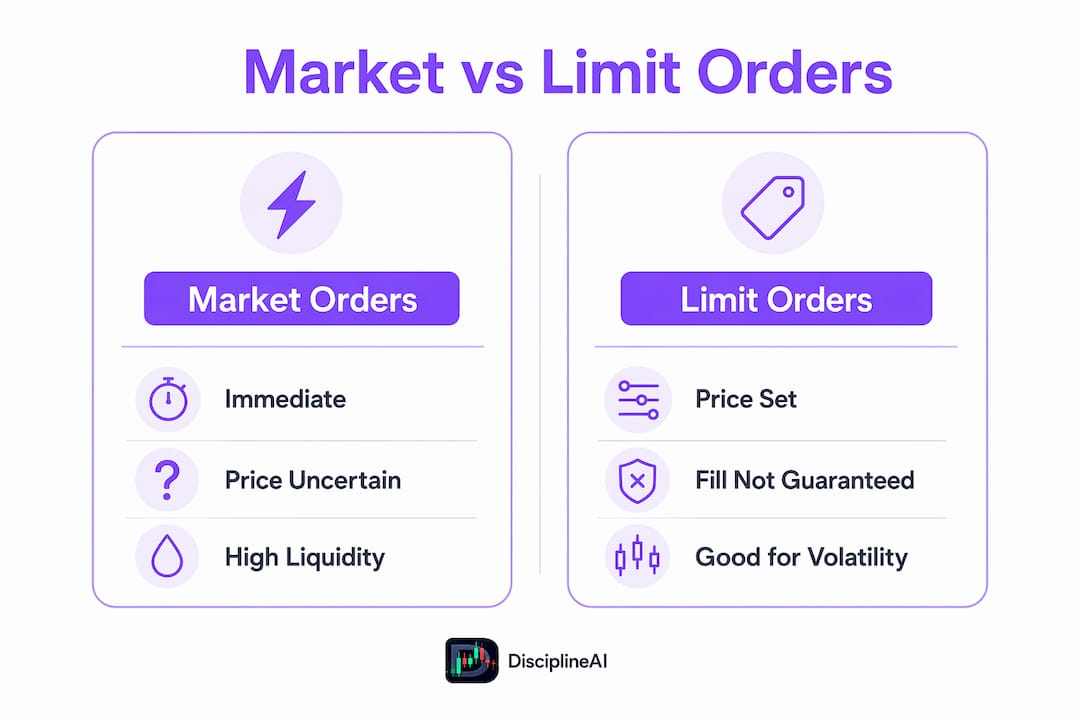
Use a market order when speed matters more than price, and a limit order when price matters more than speed. That one sentence covers most of the decisions you'll face. Three quick rules-of-thumb: (1) default to market orders for liquid ETFs and large-cap stocks during regular trading hours; (2) switch to limit orders for thinly traded stocks, volatile conditions, or any time you have a firm price in mind; (3) flip your default to limit orders if your order is large, the market is closed, or breaking news just hit.
Table of Contents
- What is a market order and how does it work?
- What is a limit order and why it might not fill
- How market structure and timing create execution risk
- Which order type fits your situation?
- How to place market and limit orders step by step
- How execution analytics reduce slippage and sharpen order decisions
- Key Takeaways
- The mistake most beginners make with order types
- Disciplineaiapp brings execution intelligence to your order decisions
What is a market order and how does it work?
FINRA defines a market order as an instruction to buy or sell immediately at the best available price. You get execution certainty. You do not get price certainty.
Here is what that looks like in practice. Say you want to buy 500 shares of a large-cap stock quoted at $50.00 ask. You submit a market order. If 500 shares are sitting at that ask, you fill at $50.00. But if only 200 shares are available at $50.00 and the next 300 are offered at $50.05, your average fill is $50.03. That two-cent difference is slippage, and it compounds on larger orders.
When market orders make sense:
- Highly liquid ETFs like SPY or QQQ during regular hours
- Large-cap stocks with tight bid-ask spreads (under $0.02)
- Situations where missing the trade entirely is worse than paying a few extra cents
- Fast exits when a position is moving against you and speed is the priority
For widely traded ETFs and large-cap stocks, market orders usually execute at prices very close to the quoted price because of deep liquidity. The risk rises sharply in thin markets.
Pro Tip: Never place a market order before the regular session opens or after it closes. Pre-market and after-hours spreads can be several times wider than intraday spreads, and your fill can land far from the last quoted price. Set a limit instead, or wait.
What is a limit order and why it might not fill
A limit order executes only at your specified price or better. A buy limit order fills at your limit price or lower; a sell limit order fills at your limit price or higher. Price is guaranteed in one direction. Execution is not guaranteed at all.
How buy and sell limits behave:
- You want to buy ABC stock, currently trading at $25.00. You place a buy limit at $24.50. The order sits in the queue until the price drops to $24.50 or below. If it never drops, you never buy.
- You own XYZ stock at $40.00 and want to sell at $42.00. You place a sell limit at $42.00. If the stock rises to $42.00, you sell. If it peaks at $41.80 and reverses, the order expires unfilled.
The numeric math matters here. On a 200-share order, a $0.50 limit that saves you from overpaying is worth $100. But if the stock runs $3.00 past your limit while you wait, the opportunity cost is $600.
Limit orders do not guarantee a fill; they execute only if the market reaches the specified price or better. Time-in-force settings compound this. A Day order expires at the close if unfilled. A GTC (Good Till Canceled) order stays active until you cancel it or the broker's maximum holding period expires, typically 60–90 days. IOC (Immediate or Cancel) fills whatever it can right now and cancels the rest. FOK (Fill or Kill) demands a complete fill immediately or cancels entirely.

Limit orders are preferable when you're trading illiquid names, when a stock is moving fast and you want a ceiling on what you pay, or when you're protecting against slippage on a position you're not in a rush to enter.
How market structure and timing create execution risk
Slippage, price gaps, and partial fills are not edge cases. They're the normal cost of ignoring order-type mechanics.
Three execution risks every trader should understand:
- Slippage: The difference between the price you expected and the price you got. A market order in a thin market can sweep through several price levels before filling, especially on larger sizes.
- Price gaps: Overnight news, earnings releases, or macro events can cause a stock to open several dollars away from where it closed. A market order placed the night before fills at the open price, which may be far from the last quote you saw.
- Partial fills: Both order types can fill partially. Partial fills are more likely with limit orders in thin markets and with large market orders that sweep multiple price levels. You end up owning half a position at a price that no longer makes sense.
How liquidity and bid-ask spread change the math:
| Factor | Market Order Effect | Limit Order Effect |
|---|---|---|
| Deep liquidity (SPY, AAPL) | Fills near quoted price, minimal slippage | Fills quickly if priced near market |
| Thin liquidity (small-cap) | High slippage risk, sweeps levels | May not fill; partial fills common |
| Wide bid-ask spread | You pay the full spread on entry | You can post inside the spread |
| Opening/closing auction | Unpredictable fill; gaps possible | Can use MOO/MOC to control timing |
| Breaking news / halt | Extreme slippage or no fill | Limit protects ceiling/floor |
Market orders placed during fast-moving markets or off-hours can execute at prices significantly different from the last quoted price due to price gaps and slippage. The opening auction is a specific danger zone: the first print of the day can be several percent away from the prior close, and a market order submitted the night before has no protection against that gap.
Scenario: You hold a small-cap stock and submit a market sell order after hours. The stock opens down 8% on light volume. Your market order fills at the open print, not the prior close. A limit order set at the prior close's bid would have either protected your floor or simply not filled, giving you a chance to reassess.
Which order type fits your situation?
The right choice depends on three variables: liquidity, volatility, and urgency. Map those three to a decision.
Rules-of-thumb by scenario:
- Liquid ETFs (SPY, QQQ, IWM) during regular hours: Market orders are fine. Spreads are tight and depth is deep.
- Large-cap stocks (AAPL, MSFT) at normal volume: Market orders work. Slippage is typically negligible.
- Thinly traded equities (under 500K average daily volume): Use limit orders. The spread alone can cost you more than a day's expected move.
- Earnings or news events: Limit orders. Volatility spikes widen spreads and gaps appear instantly.
- Large orders (more than 1% of average daily volume): Split the order into smaller pieces, or use limit orders with IOC to avoid sweeping the book.
- Intraday scalping: Limit orders to post inside the spread and capture price improvement; market orders only for urgent exits.
Dos and don'ts:
- Do check the bid-ask spread before submitting any market order on a name you don't trade regularly.
- Do split large orders rather than sending one block that moves the market against you.
- Don't place market orders in the first or last five minutes of the session if you're not experienced with auction dynamics.
- Don't set a limit so far from the current price that it never fills, then forget it's sitting in GTC.
Stop and stop-limit orders as complementary tools: A stop order triggers a market order once a price threshold is hit, useful for cutting losses automatically. A stop-limit order triggers a limit order instead, giving you price control but reintroducing the risk of non-execution. Investor.gov notes that when the stop price is reached, a stop order becomes a market order, so the same slippage risks apply. Understanding liquidity sweep dynamics helps you set stop levels that don't get triggered by normal intraday noise.
| Scenario | Liquidity | Volatility | Urgency | Recommended Order |
|---|---|---|---|---|
| Liquid ETF, regular hours | High | Low | Any | Market |
| Large-cap stock, normal day | High | Low-Med | Any | Market |
| Small-cap stock | Low | Any | Low | Limit |
| Earnings announcement | Any | High | Low | Limit |
| Large block order | Any | Any | Low | Limit (split) |
| Fast exit, liquid name | High | High | High | Market |
How to place market and limit orders step by step
The mechanics differ slightly across brokers, but the sequence is consistent. Charles Schwab's education resources and Vanguard's order-type guides both walk through the same core steps.
Placing a market order:
- Log in to your brokerage account and navigate to the trade ticket.
- Enter the ticker symbol and select "Buy" or "Sell."
- Enter the number of shares.
- Select "Market" as the order type.
- Confirm the session (regular hours only, unless you intentionally want extended-hours execution).
- Review the order summary and submit.
- Check the order status screen within seconds. A market order in a liquid name fills almost immediately.
Placing a limit order:
- Follow steps 1–3 above.
- Select "Limit" as the order type.
- Enter your limit price. For a buy, this is the maximum you'll pay. For a sell, the minimum you'll accept.
- Choose your time-in-force: Day (expires at close), GTC (stays open until canceled), IOC (fill what's available now, cancel the rest), or FOK (full fill now or cancel).
- For orders timed to the open or close, select MOO (Market on Open) or MOC (Market on Close) if your broker offers them, understanding these become market orders at the auction.
- Review and submit.
Before you hit submit, check these:
- Is your order size reasonable relative to the displayed depth? If the ask shows 200 shares and you're buying 2,000, expect a sweep.
- Is the pre/post-market flag set correctly? An unintended extended-hours flag on a limit order can fill at a price you wouldn't accept during regular hours.
- Did you confirm the order type? Many broker interfaces default to market orders.
After submission:
- Confirm the order appears in your open orders or order history.
- For limit orders, check back before the session closes if you placed a Day order.
- If partially filled, decide whether to cancel the remainder or let it ride.
- For GTC orders, review weekly. Markets move; a limit set two weeks ago may no longer reflect your thesis.
Pro Tip: After any fill, compare your execution price to the NBBO (National Best Bid and Offer) at the time of submission. Most brokers display this in the trade confirmation. A consistent gap between your expected price and actual fill is a signal to reassess your order strategy.
How execution analytics reduce slippage and sharpen order decisions
Knowing which order to use is one thing. Knowing whether a limit order is likely to fill right now, given current order-book depth and volatility, is another level entirely.
Execution analytics tools analyze liquidity heatmaps, historical slippage patterns, and real-time order-book structure to shift the decision from guesswork to evidence. When a tool shows that the bid side is thin three levels deep, a market sell order looks a lot riskier than it did a minute ago. When historical data shows a stock consistently fills limit orders within two cents of the mid during the first hour, posting a passive limit becomes the higher-probability play.
Disciplineaiapp's platform applies this kind of analysis to crypto, forex, and stock trades. Its AI trade analysis surfaces confidence scores and execution guidance that flag when a limit is likely to fill versus when urgency justifies a market order. The platform also includes stand-aside protection, which signals when conditions are poor enough that neither order type is worth the risk. That said, no tool replaces your own judgment on live order-book conditions. Use confidence scores as one input, verify current depth yourself, and keep manual override available.
Pro Tip: Before placing any order in a volatile or thinly traded name, pull up the Level 2 quote screen. The depth of the order book tells you more about likely slippage than any single price quote.
Key Takeaways
Market orders guarantee execution; limit orders guarantee price direction. Matching the right order to your situation is what separates disciplined execution from expensive mistakes.
| Point | Details |
|---|---|
| Speed vs. price trade-off | Market orders fill immediately; limit orders fill only at your price or better, never both at once. |
| Liquidity drives the choice | Use market orders for liquid ETFs and large-caps; switch to limit orders for thinly traded or volatile names. |
| Limits don't guarantee fills | A limit order sits unfilled if the market never reaches your price; time-in-force settings control how long it waits. |
| Slippage and gaps are real costs | Off-hours market orders and large block orders can fill far from the quoted price; partial fills add position-sizing risk. |
| Disciplineaiapp execution guidance | Disciplineaiapp's confidence scoring and stand-aside protection help identify when a limit is likely to fill and when to stay out entirely. |
The mistake most beginners make with order types
The most common error isn't choosing the wrong order type once. It's choosing the wrong one repeatedly because no one ever checked the fills.
Beginners place market orders in thinly traded stocks because the interface defaults to it, then wonder why they paid $0.30 more than the quoted price. They place limit orders at round numbers during earnings season, watch the stock gap straight through their price, and assume the order filled. It didn't. The stock moved past the limit so fast that the order never triggered.
A few discipline habits fix most of this. Before every trade, check the spread and the order-book depth. After every fill, compare the execution price to what you expected. Log the difference. After 20 trades, patterns emerge: maybe you consistently overpay on market orders in the first 15 minutes of the session, or your GTC limits expire unfilled because you set them too conservatively.
Journaling fills isn't glamorous, but it's the fastest feedback loop available. One trader who started tracking execution quality found that switching from market to limit orders on small-cap entries cut average entry cost meaningfully over a quarter, simply by posting inside the spread instead of crossing it. The role of trading psychology in these decisions matters too: urgency bias pushes traders toward market orders even when a limit would serve them better.
Disciplineaiapp brings execution intelligence to your order decisions
Knowing the theory of market vs limit orders is the starting point. Applying it consistently under live conditions, across different assets and volatility regimes, is where most traders lose ground.

Disciplineaiapp gives you AI-generated trade setups with confidence scores, real-time market structure analysis, and stand-aside signals that tell you when conditions favor neither order type. The platform covers crypto, forex, and stocks, with execution guidance built into each setup so you're not guessing whether to post a limit or cross the spread. It also includes automated trade journaling and performance analytics, so your fill quality improves over time rather than staying flat. Disciplineaiapp operates on a subscription model available on iOS and Android, with a free trial to start. Visit the AI Learning Center to explore execution guidance features and see how confidence scoring works before your next trade.
This article is general educational information, not investment or financial advice. Confirm current rules and order mechanics with your broker or a qualified financial professional before trading.
Authoritative sources and further reading
- Types of Orders | Investor.gov (SEC) — primary definitions for market, limit, and stop orders; read this first.
- Order Types | FINRA.org — FINRA's definitions and time-in-force explanations; authoritative for U.S. retail investors.
- Market Orders vs. Limit Orders | Investopedia — practical comparison with examples of slippage and opportunity cost.
- Stock & ETF Orders | Vanguard — broker-level guidance on order placement and when to use each type.
- Market Orders: How They Work | CMC Markets — covers off-hours risks and professional limit-order strategies.
- Disciplineaiapp Blog — execution analysis, market structure, and AI-assisted order strategy for active traders.