A trading lockout rule is a preset restriction, self-imposed or platform-enforced, that blocks you from opening new positions for a fixed period once a trigger like a daily loss limit or profit target fires. If you've ever revenge traded after a loss or piled on size to chase a green day, you need one active before your next session, not after your next bad one.
TL;DR:
- Properly configured lockouts prevent revenge trading and impulsive size increases after losses, especially when using fixed percentage or dollar-based thresholds.
- Lockouts should be set in advance during calm periods; testing them on demo accounts before live trading ensures they activate correctly under real conditions.
- Most platform lockout features are not truly irreversible; verify whether they flatten positions, are account-wide, and apply across devices before relying on them.
- Short cooldowns of 15 to 60 minutes suit day traders addressing single mistakes, while longer lockouts are better for pattern behaviors or multiple rule violations.
- Self-imposed lockouts work best when they target behavioral patterns and are regularly reviewed to adapt thresholds as account sizes and market conditions change.
Table of Contents
- What Is a Trading Lockout Rule and How Does It Work?
- How to Set Up a Lockout Before You Need It
- Lockout Rule Templates You Can Copy Today
- The Psychology Behind Why Lockouts Actually Work
- What to Check Before You Trust a Platform's Lockout Feature
- How Discipline AI Applies Lockout Logic to Behavioral Coaching
- Corporate Blackout Periods Are Not the Same as Your Lockout
- Regulatory Context: Why This Matters Even for Retail Traders
- How Lockout Rules Compare Across Trading Platforms
- Day Trading vs Swing Trading: Different Lockout Needs
- Common Pitfalls When Building Your Own Lockout Rules
- When Lockouts Are the Right Fix and When They Are Not
- Try an Automated Approach to Discipline Instead of Relying on Willpower Alone
- Sources
- FAQ
What Is a Trading Lockout Rule and How Does It Work?
A lockout works by removing your ability to act, not by asking you to behave better. Once a threshold is hit, the system cancels open orders, rejects new entries, and in some setups flattens existing positions automatically. The trigger decides everything: some lockouts freeze one account, others block trading platform-wide, and a few operate using simple alerts and personal commitments.
There are several flavors worth knowing:
- Manual lockout: you flip a switch yourself, usually inside your broker's risk settings, after deciding you've had enough for the day.
- Account-level lockout: applies to a single funded or live account while leaving demo or other accounts untouched.
- Session or time-based lockout: blocks trading for a set window, such as 30 minutes after a loss or until the next session opens.
- Daily loss limit lockout: fires automatically once cumulative losses hit a dollar or percentage ceiling.
- Daily profit-target lockout: locks you out after a win, protecting gains from being given back.
- Automated risk-settings lock: a broker or prop-firm feature that ties lockout behavior directly to your account's risk parameters.
Platform limits matter more than most traders realize. Some timers are genuinely irreversible once set, which is the entire point, while others exist only on simulation or evaluation accounts and never carry over to live trading. Check that distinction before you build your whole plan around a feature that quietly disappears the moment real money is on the line.
How to Set Up a Lockout Before You Need It
Lockouts fail when traders try to configure them mid-meltdown. The setup has to happen while you're calm, bored, or simply reviewing your account, not staring at a red P&L.
- Define your threshold in advance. Pick a number, either a dollar loss or a percentage of account equity, that represents "done for today." Write it down somewhere other than your head.
- Choose a duration that matches the offense. A 30-minute cooldown suits a single bad trade; a 24-hour lockout suits a day where you broke your own rules twice.
- Test the rule in simulation first. Run it for a handful of sessions on a demo or evaluation account before trusting it live, since a sound testing cycle means adopting a template, running it 10 to 30 sessions, and adjusting based on measured outcomes, not gut feel.
- Save it as a profile. Most platforms let you store risk settings so you're not rebuilding the rule from scratch every morning.
- Know exactly what happens when it fires. Some lockouts cancel working orders only; others flatten open positions too. Read your platform's documentation so there's no surprise.
Preconfiguring matters because waiting until you're already tilted to build a rule usually fails — the clicks and menus become one more obstacle your emotional brain talks you out of.
Pro Tip: Set your lockout hotkey or saved profile the night before a session you know will be volatile (an FOMC day, an earnings morning). Deciding your limit in advance costs nothing; deciding it mid-drawdown costs your account.
Lockout Rule Templates You Can Copy Today
Generic advice like "trade less" doesn't survive contact with a losing streak. Specific numbers do. Here are three templates worth adapting to your own account size and risk tolerance:
- The 2% rule: hit a 2% daily loss on account equity, and you're locked out for 24 hours. This suits swing traders and anyone trading a funded evaluation account with strict daily drawdown rules.
- The $500 drawdown rule: lose $500 intraday (adjust the number to your size), and you're locked out for 30 minutes minimum before any new entry. Built for day traders who need a short reset rather than a full day off.
- The profit-lock rule: hit your daily profit target, and the session locks entirely. This one protects you from the trader who turns a great morning into a mediocre day by overtrading into the close.
Scale these to your account. A $5,000 account and a $50,000 account shouldn't use the same dollar figure. What should stay constant is the ratio: a fixed percentage of equity, not an arbitrary flat number that meant something three months ago.
Short cooldowns, in the 15 to 60 minute range, work best for a single mistake, like an oversized entry or an obviously impulsive trade. Longer lockouts, end of day or 24 hours, belong to pattern behavior: two or three rule violations in one session signal something bigger than a bad trade.
The Psychology Behind Why Lockouts Actually Work
Willpower loses to drawdown almost every time. The trader who sets a rule at 7:00 AM is not the same trader who's down $800 by 11:00 AM, and a lockout works by taking the second trader's vote away entirely.
Practitioner arguments describe a lockout as a contractual commitment your calm self makes on behalf of your future emotional self, one that can't be renegotiated in the moment it matters most.
This addresses three specific failure modes. Loss aversion gets distorted under drawdown, making a trader chase a loss back rather than accept it. Escalation of commitment pushes traders to add size to a losing position just to feel like the original decision was right. And impulsive size increases, doubling down after two losses to "make it back faster," are exactly the behavior a hard lockout physically prevents.
The institutional world already runs on this logic. Corporate blackout periods commonly run two weeks to a month around earnings and material events, not because insiders lack judgment, but because removing the opportunity to act beats trusting judgment under pressure. Individual lockouts apply the same principle at the scale of a single trading session.
Pro Tip: If you keep finding a workaround for your own lockout, whether that's a second brokerage account or a demo you "just check," the rule isn't the problem. Your enforcement mechanism is.
What to Check Before You Trust a Platform's Lockout Feature
Not every lockout feature does what you assume. Before building your risk management around one, verify a few things directly with your broker or platform.
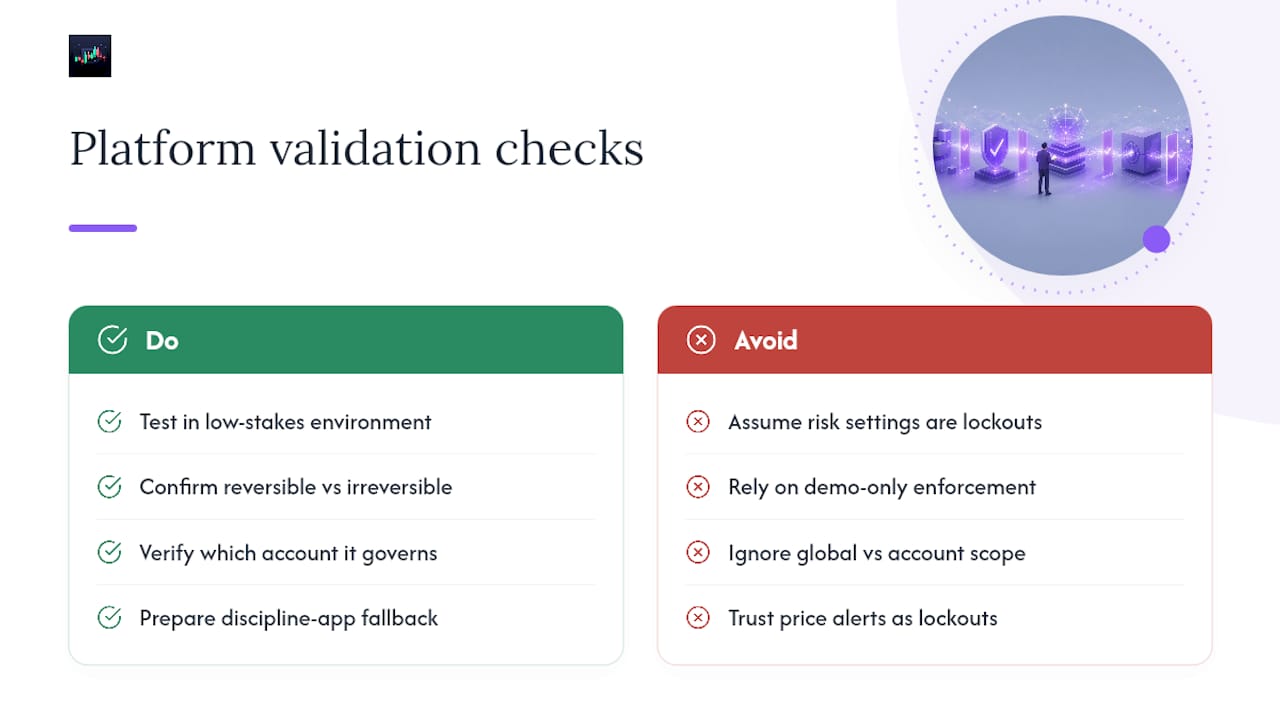
- Is the lock account-level or global? A per-account lock that leaves your other accounts open defeats the purpose if you trade multiple accounts.
- Is the timer genuinely irreversible, or can support staff or a settings menu cancel it?
- Does the trigger flatten positions, or does it just block new orders while leaving existing trades running?
- Is the feature available on live accounts, or only in simulation and evaluation environments?
- Does enforcement carry across desktop, mobile, and API access, or can you route around it from a different device?
Read the fine print. A lockout that only stops you on desktop while your phone app stays fully functional isn't a lockout, it's an inconvenience.
How Discipline AI Applies Lockout Logic to Behavioral Coaching
Discipline AI builds lockout logic into a broader discipline system rather than treating it as a standalone switch. Its stand-aside protection flags conditions where sitting out is the statistically sound move, while rule templates let traders preconfigure thresholds before a session starts, the same principle behind any effective lockout.
What sets this apart from a simple broker-side timer is the feedback loop. Automated trade journaling logs every rule violation and the context around it, and performance analytics turn that log into a measurable answer to the question every trader eventually asks: is this rule actually reducing my repeat violations, or am I just breaking a different rule now? Behavioral coaching built on that data adapts guidance as conditions and habits change, rather than leaving the lockout to run in isolation.
Corporate Blackout Periods Are Not the Same as Your Lockout
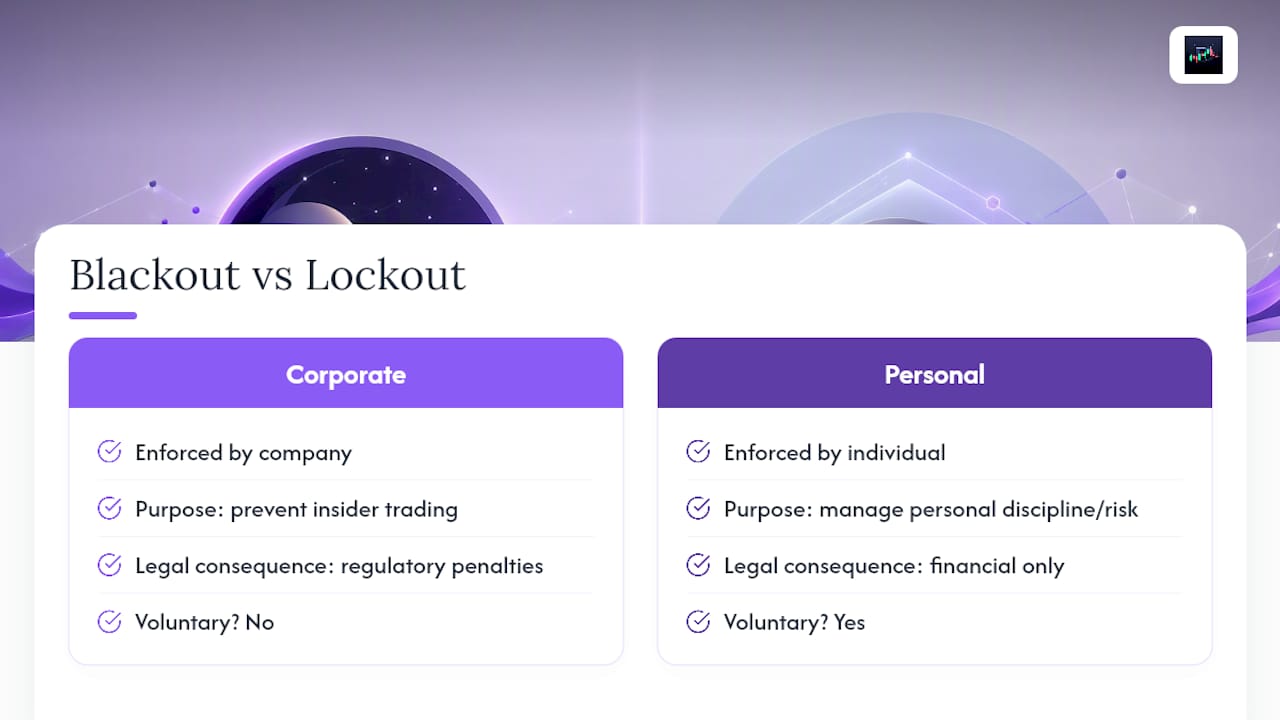
Conflating these two terms causes real confusion, and the legal stakes are completely different. A corporate blackout period is a company-imposed restriction that prevents insiders, executives, board members, and sometimes employees with access to material nonpublic information, from trading company stock during sensitive windows, typically around earnings releases or major announcements. It exists to prevent insider trading violations, not to manage anyone's emotional discipline.
Your personal trading lockout is voluntary and self-directed. Nobody regulates it, no securities law requires it, and breaking it carries zero legal consequence, only a financial one. The two concepts share a structural idea, restricting trading activity for a defined period, but the legal context couldn't be more different.
The connection worth understanding is regulatory design. SEC rule amendments to Rule 10b5-1 introduced cooling-off periods, commonly around three months for officers and directors and shorter periods for other insiders in certain cases, before a prearranged trading plan's protections kick in. Regulators built in a delay specifically because immediate trading access creates opportunity for impulsive or manipulative decisions. That's the same behavioral logic your personal lockout leans on, just applied to a completely different problem with completely different stakes.
Don't borrow legal language from one context and apply it to the other. If you tell people you're in a "blackout period" because you had a bad trading day, you're using insider-trading vocabulary for a personal risk rule, and it muddies a term that has real regulatory weight.
Regulatory Context: Why This Matters Even for Retail Traders
Individual trading lockouts sit outside securities regulation, but the regulatory framework around cooling-off periods explains why lockout mechanics work and why regulators trust them enough to codify them.
Rule 10b5-1 lays out affirmative defenses for insiders who trade under prearranged plans, conditioned on cooling-off timing, single-plan limitations, and certification requirements. The rule exists because regulators recognized that a gap between decision and execution reduces the odds that a trade reflects information or impulse from the moment of execution rather than the calmer moment of planning. That's precisely the mechanism your daily-loss lockout exploits: the rule gets written when you're rational, and it executes regardless of what you feel three hours later.
For retail traders, there's no compliance officer checking whether you honored your own lockout. The only enforcement is whatever friction you built into your platform or account settings. This is where the comparison to institutional practice actually helps: institutions don't rely on individual discipline to make cooling-off periods work, they rely on structural inability to act outside the rule. Copy that design principle rather than assuming a written note on your desk will hold up under pressure. If you're trading a funded or prop account, also check your firm's own daily-loss and drawdown rules; many prop firms enforce lockouts as a condition of the account agreement, not as an optional feature, and violating theirs can end the account entirely, separate from any personal rule you set.
How Lockout Rules Compare Across Trading Platforms
Lockout support varies widely, and the differences matter more than most comparison charts suggest. Retail brokerage platforms generally offer basic risk settings, think daily loss caps or margin call thresholds, but true irreversible lockout timers are less common outside of specialized risk-management add-ons or prop-firm evaluation software.
Prop trading firms tend to build the strictest lockouts, because their business model depends on traders not blowing through drawdown limits. Many funded-account providers enforce a daily loss limit that locks the account automatically, sometimes for the rest of the day, sometimes permanently if it's a hard breach. These aren't optional features you toggle; they're baked into the account rules from day one.
Futures and forex platforms with advanced risk modules often let you set account-level locks tied to realized P&L, while some only support this on demo or simulation accounts, leaving live enforcement up to you manually flattening positions and stepping away. Crypto exchanges and mobile-first trading apps vary the most; a handful offer genuine time-locked cooldowns, but many offer nothing beyond a basic price alert.
The practical takeaway: don't assume your platform has a real lockout just because it has risk settings. Test the feature in a low-stakes way first, confirm whether it's reversible, and check whether it's tied to your specific account or applies globally across every account you hold with that provider. If your platform genuinely lacks the feature, a discipline-focused app layered on top of your broker can fill that gap.
Day Trading vs Swing Trading: Different Lockout Needs
Day traders need short, frequent lockouts. A single overtraded morning session can wipe out a week of gains, so a 30 to 60 minute cooldown after a defined loss, paired with a hard daily loss limit that ends the trading day entirely, fits the rapid pace and higher trade frequency of intraday strategies. The risk compounds fast when trades happen every few minutes, so friction has to kick in fast too.
Swing traders face a different risk profile. Positions are held for days, sometimes weeks, so the danger isn't rapid-fire overtrading within a session, it's impulsively adding to or exiting a position because of intraday noise that has nothing to do with the original thesis. A swing trader's lockout often works better as a rule against checking or adjusting positions outside a defined review window, rather than a same-day loss trigger. Some swing traders set a weekly loss limit instead of a daily one, since a single bad week matters more than a single bad session.
Position traders and longer-horizon investors generally need the lightest lockout structure, since trade frequency itself is naturally low, but they're not immune. A trader holding a losing position past their own stop because "it'll come back" is experiencing the exact same escalation-of-commitment bias a day trader feels, just stretched over weeks instead of minutes. The lockout there might be a rule against moving a stop loss once it's set, enforced by simply not having order-modification access during certain hours.
Common Pitfalls When Building Your Own Lockout Rules
The biggest failure mode is setting a threshold too loose to matter.
The second common mistake is building a lockout with an easy workaround, a second account, a different device, a support ticket to unlock early. If bypassing your own rule takes less effort than honoring it, the rule will get bypassed eventually. Treat the workaround problem as seriously as the threshold itself.
Traders also tend to set a rule once and never revisit it. A lockout calibrated for a $2,000 account doesn't fit the same trader six months later at $10,000, and a rule that felt right during calm markets might be wrong during high volatility. Reviewing journaled sessions regularly, rather than setting and forgetting, catches this drift before it costs money.
Finally, some traders confuse a lockout with a strategy fix. If you're locking yourself out every single day because your entries are fundamentally flawed, the lockout is masking a strategy problem, not solving a discipline problem. Recognizing revenge trading patterns early helps separate "I need a break" from "I need a different edge."
When Lockouts Are the Right Fix and When They Are Not
Lockouts earn their place when the pattern is behavioral: the same trader, the same triggers, the same impulsive reaction to a loss. If that's your situation, the rule works. But if you're locking yourself out constantly and still losing steadily even on the days the lockout never fires, the honest read is that your edge, not your discipline, needs the review.
Check your journal every couple of weeks. If violation rates are dropping and drawdown magnitude is shrinking, tighten the thresholds further. If you're still bleeding on "clean" days, that's your signal to revisit strategy or seek coaching, not to add a stricter timer.
— Tony
Try an Automated Approach to Discipline Instead of Relying on Willpower Alone
Building and enforcing your own lockout takes real discipline just to set up correctly, and most traders abandon the manual version within a few weeks. Discipline AI removes that setup burden by building stand-aside protection, rule templates, and behavioral coaching directly into the platform, so the lockout logic runs automatically instead of depending on you remembering to flip a switch mid-drawdown.
Before committing to any tool, run it the same way you'd test a lockout template: try it in simulation, track measurable outcomes like violation frequency and profit retention, and only scale up once the data backs it. Discipline AI's Pro plan starts at $8.99 per month, with annual and one-time options also available, and The Disciplined Trader at $79 one-off offers a structured path if you want a guided framework rather than building your own rules from scratch. Check the pricing page and pick the option that matches how seriously you're ready to take your next session.
Sources
For deeper reading, consult the SEC's Rule 10b5-1 text and your own broker's platform documentation for account-specific lockout mechanics.
This article is general information, not a substitute for advice from a qualified financial advisor. Consult a qualified financial professional about your own circumstances before acting on anything here.
- Insider trading arrangements and related disclosures — Federal Register
- Not so black and white: executing capital markets transactions during quarterly blackout periods — Willkie Farr & Gallagher (2025)
- What Is a Blackout Period in Finance? — Investopedia
- 17 CFR § 240.10b5-1 — Trading plans and affirmative defenses — Cornell Law School LII
FAQ
Can I still trade with a 90-day restriction?
Yes, a 90-day restriction typically refers to the cooling-off period under Rule 10b5-1 for corporate insiders adopting a prearranged trading plan, not a personal lockout. Individual traders can trade freely during any self-imposed 90-day rule unless the restriction comes from a prop firm's account agreement, which may enforce it as a hard condition.
What is the 7% rule in trading?
The 7% rule is a stop-loss guideline, not a lockout rule, commonly associated with cutting a losing stock position once it falls 7% to 8% below your purchase price to limit downside. It's unrelated to trading lockout mechanics but often gets paired with a lockout as a complementary risk control.
How do you lock yourself out of trading?
You lock yourself out by presetting a threshold, a daily loss limit, a drawdown dollar amount, or a profit target, inside your broker's risk settings or a dedicated discipline app, so the system blocks new orders once that trigger fires. The setup has to happen before your session starts, since configuring it mid-drawdown rarely works once emotions take over.
Can you day trade if you have less than $25,000?
Yes, but pattern day trader rules under FINRA restrict traders with low margin account balances to a maximum of three day trades within five business days. This is a separate regulatory rule from a trading lockout, though many traders use a personal lockout to stay under that threshold voluntarily and avoid triggering the restriction altogether.